Knowing About The Difference Between Chrome Vs Safari
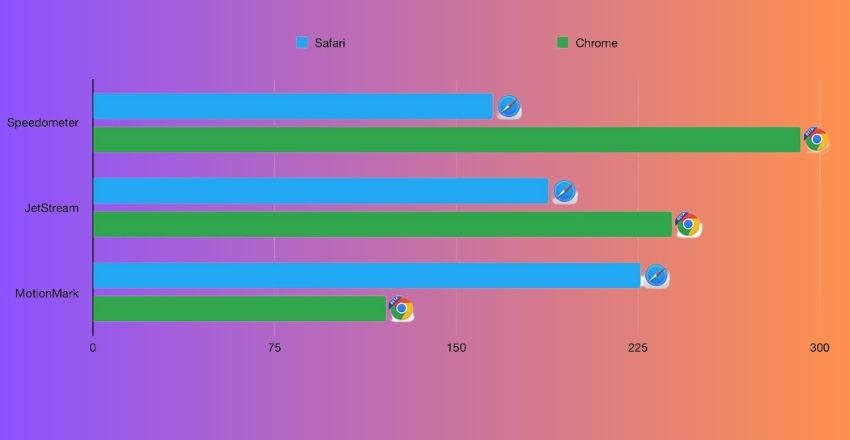
Chrome vs Safari represents one of the most discussed comparisons in modern web browsing. They differ in engine design, speed, and efficiency, with Chrome using the Blink engine and V8 JavaScript compiler, scoring around 300 points in responsiveness tests and improving graphics by 15% on current hardware.
Safari relies on Apple’s WebKit engine, optimizing battery use by consuming roughly 0.7 W less power and integrating seamlessly with macOS and iOS. Choosing the right browser depends on priorities: performance, extensions, or privacy. For users balancing speed and efficiency, understanding the advantages and trade-offs of Chrome & Safari is crucial, making informed decisions easier in the Chrome vs safari debate.
| Feature | Chrome | Safari |
| Engine | Blink + V8 | WebKit |
| Speed | Fast, +15% graphics | Optimized for Apple |
| Responsiveness | 300 pts | ~7% slower |
| RAM | High usage | Low usage |
| Power | Higher drain | ~0.7 W less |
| Extensions | Thousands | Limited |
| Customization | Very flexible | Apple-integrated |
| Cross-Platform | Windows, macOS, Linux, Android, iOS | macOS/iOS only |
| Sync | Google account | iCloud |
| Privacy | Less private | Strong tracking block |
| Security | Frequent updates | Sandboxing + ITP |
| Battery | Faster drain | Longer life |
| Developer Tools | Extensive | Limited |
| Ecosystem | Mixed devices | Apple-only |
| Updates | Frequent | Tied to Apple OS |
| Best Use | Power & cross-platform | Apple ecosystem |
Chrome Vs Safari: Speed & Engine Performance
When comparing Chrome vs Safari, benchmarks show notable differences: Chrome achieved a score of around 300 in a major responsiveness test, outpacing Safari by roughly 7%. Meanwhile, graphics performance improved by up to 15% for Chrome on recent hardware. Safari uses Apple’s WebKit engine, optimized for efficiency on macOS/iOS, while Chrome uses the Blink engine plus V8 JavaScript compiler, tuned for cross‑platform speed and heavy scripting.
Memory & Resource Usage
In the Chrome vs. Safari comparison, resource use shifts depending on whether Safari is designed to use less RAM and manage battery power better on Apple devices. Users report Safari consuming about 0.7 W less power than Chrome under similar loads.
Chrome, however, uses more system resources but handles dozens of tabs and extensions with fewer slowdowns. The trade‑off: Chrome is heavier but more flexible, Safari is lighter but less extensible.
Extensions & Customization
With Chrome vs Safari, extension availability and customization vary widely. Chrome supports thousands of extensions via the Chrome Web Store, covering every need from productivity to development. Safari offers fewer choices in its App Store but emphasizes quality over quantity.
While Safari users get well‑integrated extensions for Apple hardware, Chrome users enjoy broader customization and more frequent updates—a clear advantage for users needing extensive tooling and tweaks.
Cross‑Platform Availability
Looking at Chrome and Safari, platform support is a significant distinction. Chrome runs on Windows, macOS, Linux, Android, and iOS, enabling consistent sync of tabs, bookmarks, and history across devices.
Safari is primarily available on macOS and iOS, with limited Windows support and none for Android or Linux. So, users working on mixed devices will find Chrome’s reach superior, whereas those in the Apple ecosystem may prefer Safari’s tighter hardware integration.
Privacy & Security Differences
- In Chrome vs Safari, privacy and security priorities diverge.
- Safari emphasises blocking cross‑site tracking via Intelligent Tracking Prevention and restricts ad‑profiling by default.
- Chrome offers strong sandboxing and frequent security updates, but collects more user data to fuel Google services.
- If privacy is your top concern, Safari is the leader.
- If you’re tied into Google’s ecosystem and want broad utility, Chrome provides flexibility with trade‑offs.
Battery Life & Efficiency
When assessing Chrome & Safari, battery performance on laptops and mobile devices differs. Tests show Safari often outlasts Chrome on Apple hardware thanks to energy optimizations and tighter integration with system-level power management.
Chrome may offer faster raw performance, but it drains the battery faster under real‑world conditions. For long browsing sessions away from a charger, Safari is usually the better choice.
Syncing & Ecosystem Fit
In the chrome vs safari debate, the ability to sync across devices matters a lot. Chrome pairs smoothly with a Google account to sync passwords, bookmarks, and tabs across PCs and phones of different brands.
Safari uses iCloud to keep everything in sync across Macs, iPhones, and iPads, with strong ecosystem cohesion. Users heavily invested in Apple hardware find Safari seamless, but mixed‑device users lean toward Chrome for accessibility.
Developer & Future‑Ready Features
Finally, comparing Chrome vs Safari, developers will note differences in tooling and support. Chrome includes robust developer tools, wide support for modern web APIs, and bleeding‑edge feature rollout.
Safari also supports current web standards but offers fewer development resources and a slower rollout of less common features. For web developers or power users, Chrome often provides more capability, while Safari focuses on stability, integration, and power efficiency.
Conclusion
In the Chrome vs safari comparison, both browsers have clear strengths and weaknesses. Chrome excels in speed, cross-platform support, and extensive extensions, while Safari prioritizes battery efficiency, privacy, and seamless integration with the Apple ecosystem. Chrome offers speed, extensive extensions, and cross-platform syncing, while Safari provides efficiency, privacy, and better optimization for Apple devices.
Users seeking flexibility, developer tools, and performance may prefer Chrome, whereas those focused on energy savings and tighter hardware optimization will lean toward Safari. Ultimately, understanding the features, resource usage, and ecosystem fit allows users to choose the best browser for their specific needs in the Chrome vs safari debate.
Apart from that, if you want to know more about Karaoke Culture: A Traveler’s Guide to the Ultimate Japanese Pastime then visit our Tech category.
FAQs
Chrome delivers higher raw performance with its Blink engine and V8 JavaScript, scoring 300 in responsiveness tests, while Safari focuses on efficiency, though slightly slower, and is optimized for Apple devices.
Safari outperforms Chrome on Apple devices, consuming approximately 0.7 W less power, thanks to energy optimizations and tighter integration with macOS and iOS, extending battery life during long browsing sessions.
Chrome is cross-platform, available on Windows, macOS, Linux, Android, and iOS, enabling tab and bookmark syncing across devices. Safari is primarily limited to the macOS and iOS ecosystems.
Safari emphasizes privacy with Intelligent Tracking Prevention and ad restrictions, while Chrome provides frequent security updates and sandboxing, but collects more user data for Google services.
For users balancing speed and efficiency, understanding the advantages and trade-offs of Chrome & Safari is crucial, making informed decisions easier in the Chrome vs safari debate.